

If you have picked up your phone recently to check your airtime balance by dialing the famous *556#, you were likely greeted with an annoying surprise: an error message saying “Connection Invalid” or a prompt telling you the code implies an incorrect command.
You are not alone, and more importantly, your SIM card is not damaged.
Welcome to the new era of Harmonized USSD Codes in Nigeria. In a sweeping change that affects over 200 million mobile subscribers across the country, the Nigerian Communications Commission (NCC) has retired the old codes we have used for over a decade.
This is not just a small update; it is a complete overhaul of how we interact with our mobile networks. Whether you are on MTN, Airtel, Glo, or 9mobile, the rules have changed. However, as the largest network in Nigeria, MTN users are feeling the impact the most.
In this comprehensive guide, we will walk you through exactly what changed, why it happened, and provide you with the official, verified list of new codes for 2025 so you never get stranded without credit or data again.
The “Why”: Understanding the NCC Harmonization Policy
To navigate the new system, it helps to understand why the government forced this change. For years, Nigeria’s telecom sector was fragmented.
- To check balance on MTN, you dialed *556#.
- To check balance on Glo, it was *124#.
- On Airtel, it was *123#.
This was confusing for the average Nigerian, especially those who carry multiple SIM cards (which is very common). The NCC issued a directive to harmonize these shortcodes. The goal was simple: One Code, All Networks.
Now, in 2025, if you dial *310#, it will show your balance regardless of whether the SIM card in your phone is yellow (MTN), red (Airtel), or green (Glo). This standardization brings Nigeria in line with global best practices, but it requires users to unlearn years of muscle memory.
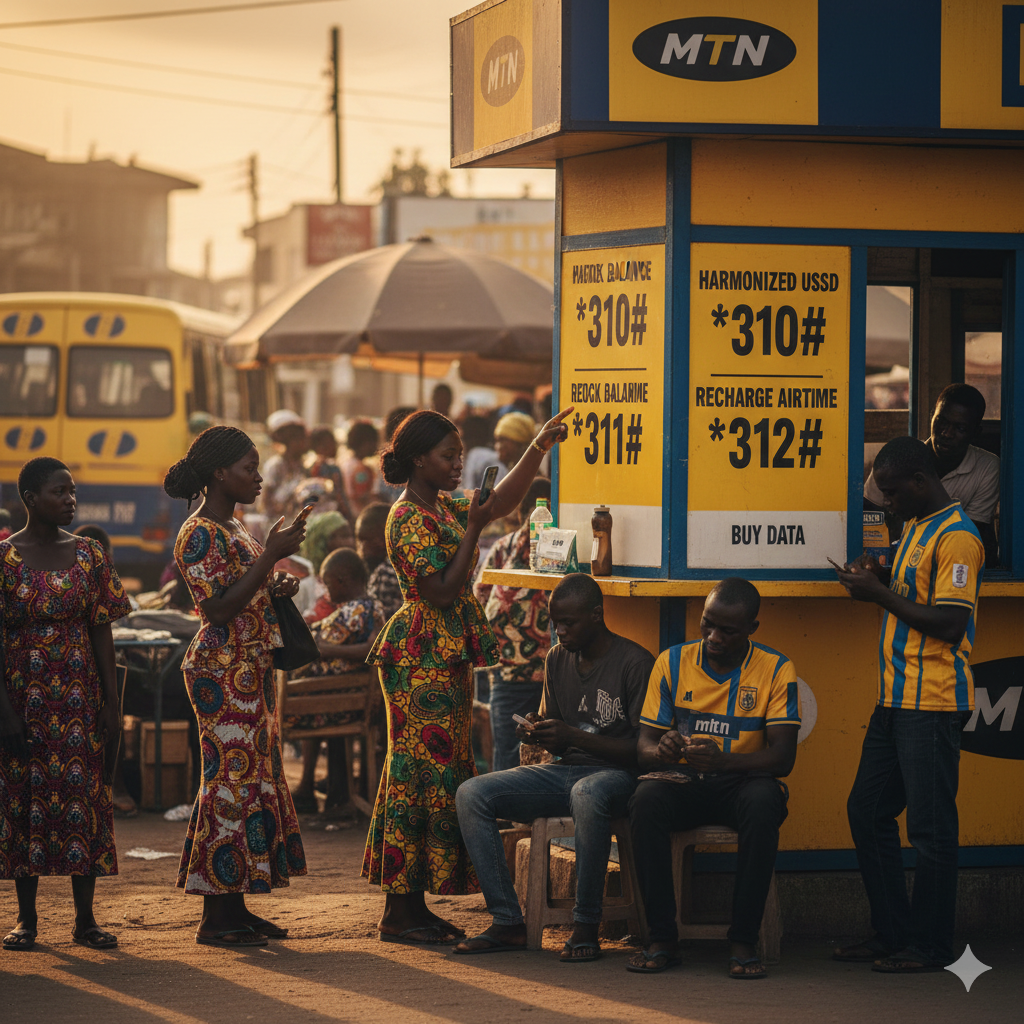
The New “Big Three”: Balance, Recharge, and Data
The three most critical functions for any mobile user are checking how much money you have, loading more money, and buying data. Here is a deep dive into how these specific codes have evolved.
1. Checking Your Airtime Balance: From *556# to *310#
The most dialed code in Nigeria is dead. *556# no longer works.
To check your main account balance, you must now dial *310#.
When you dial this code, the system will instantly display your main airtime balance on the screen. It is faster and uniform across all networks.
- Pro Tip: If you want to check your Data Balance specifically, *310# might only show your main credit. For a detailed breakdown of your data bonus and data bundles, you should use the data-specific code (discussed below).
2. Loading Airtime (Recharge): From *555# to *311#
For those who still prefer buying physical paper recharge cards from street vendors, the process has changed slightly.
Previously, you would scratch the card and dial *555*PIN#.
The New Method: You must now dial *311*PIN#.
If you mistakenly use the old code, the network might reject the PIN or give you an “Unknown Application” error.
- Example: If your recharge PIN is 1234567890, you simply dial: *311*1234567890# and send.
3. Buying Data Bundles: From *131# to *312#
The legendary *131# menu, which was the gateway to the internet for millions of Nigerians, has been migrated to *312#.
This is your new “Data Hub”. By dialing *312#, you gain access to:
- Daily, Weekly, and Monthly Data Plans.
- Social Bundles (WhatsApp, Facebook, Instagram).
- Video Streaming Bundles (YouTube).
- Data Gifting and Transfer.
Note: In the early days of the transition, MTN set up a redirect so that *131# would automatically forward you to the *312# menu. However, reliance on this redirect is risky as it will eventually be turned off completely. Start getting used to *312# today.
Borrowing Airtime: The “XtraTime” Update (*303#)
Run out of airtime in the middle of an emergency? The “Borrow Me Credit” service, officially known as MTN XtraTime, has also moved.
The old code *606# is gone. The new code to borrow airtime or data is *303#.
How it works in 2025:
- Dial *303#.
- Select “Borrow Airtime” or “Borrow Data”.
- The system will calculate your eligibility based on how long you have been on the network and your recharge frequency.
- Service Charge: Remember that MTN charges a service fee (usually 15%) on the amount borrowed. If you borrow N100, you will receive N85, but you must pay back N100.
Value Added Services (VAS) and Stopping Spam (*305#)
One of the most frustrating experiences for Nigerian mobile users is waking up to unsolicited SMS messages about betting odds, health tips, or horoscopes that deduct money from your account.
The NCC has mandated a specific code to manage these Value Added Services: *305#.
By dialing *305#, you enter a menu where you can view all active subscriptions on your line. If you notice your airtime disappearing mysteriously, dial this code immediately and select the “Stop Services” or “Unsubscribe” option to clean up your line.
NIN-SIM Linkage: The Critical Code (*996#)
We cannot talk about USSD codes in 2025 without mentioning the National Identification Number (NIN). The government has taken a strict stance: No NIN, No Network.
If your line has been barred or disconnected due to NIN issues, you need the verification code.
The harmonized code for NIN services is *996#.
Use *996# to:
- Submit your NIN to MTN.
- Check if your NIN is successfully linked.
- Troubleshoot identity verification issues.
2025 Master Comparison Table (Old vs. New)
For quick reference, here is the complete comparison. We recommend screenshotting this table or bookmarking this page.
| Service Function | Old Legacy Code (Invalid) | New Harmonized Code (2025) |
| Check Airtime Balance | *556# | *310# |
| Buy Data Plan | *131# | *312# |
| Recharge Airtime | *555*PIN# | *311*PIN# |
| Borrow Airtime | *606# | *303# |
| Check Data Balance | *131*4# | *323# |
| Share Data (Data Share) | *131*7# | *321# |
| Value Added Services | Varies | *305# |
| Customer Care Center | 180 | 300 |
| NIN Verification | *785# | *996# |
Troubleshooting: Why Is My Code Not Working?
Even with the correct codes, you might face issues. Here are common reasons why *310# or *312# might fail on your device:
1. Network Congestion
Sometimes the error “Connection Invalid” or “MMI Code Error” is simply due to bad network coverage in your area. Toggle your phone to “Flight Mode” for 10 seconds, turn it back on, and try again.
2. Postpaid vs. Prepaid
While the harmonization covers most users, some corporate Postpaid accounts have different backend configurations. If you are on a corporate line, contact your account manager if the standard codes fail.
3. Phone Settings
If your phone is set to “4G Only” or “LTE Only” for data speed, it might struggle to send USSD commands (which often use 2G/3G voice signaling pathways). Try switching your network mode to “Auto” or “2G/3G/4G”.
Conclusion
Memorizing them now will save you the frustration of failed connections when you need airtime the most.
The shift from *556# to *310# marks the end of an era for MTN Nigeria subscribers, but it is a step forward for the telecom industry. These new codes are here to stay. They are the standard for 2025 and beyond.
Is your data finishing too fast?
Now that you know how to check your balance, you need to know how to save money. Did you know there are “secret” codes that offer cheaper data than the standard *312# menu?